
One of those requirements is to confirm the number of session credits remaining and the individual institution's credit policy for requesting additional credits.
Finding the institution credit policy
- Log in to your BetterMynd counselor account
- In the Upcoming Sessions section of your dashboard, click on the client's name
- Alternatively, you can click the My Sessions tab in your top bar menu and click on the client's name
- Scroll all the way down to the Campus Credit Policy on the right side below the session protocols and resources

Confirming the number of remaining credits for the client:
When a client requests a session and you accept, the credit is removed from their account. If the session is canceled ahead of 24 hours before session start, the credit is returned.
To find the number of remaining credits for a client:
- Log in to your BetterMynd counselor account
- In the Upcoming Sessions section of your dashboard, click on the client's name
- Alternatively, you can click the My Sessions tab in your top bar menu and click on the client's name
- On the left side just below their name, you will see the number of credits remaining
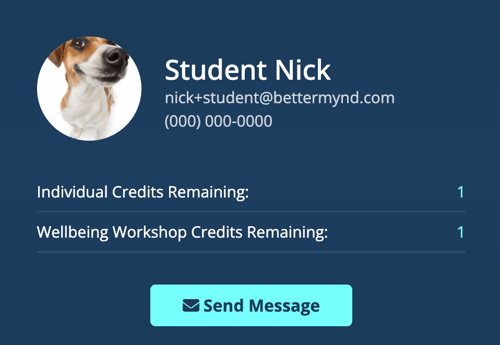
A few important reminders:
- A student could have 0 credits remaining if they have scheduled future sessions with you. Since the credit is removed at the time of booking, it is possible for a student to show 0 remaining credits and have several upcoming sessions.
- To confirm, go to your My Sessions tab and search for the student to see if they have additional upcoming sessions.
- Do not cancel a session if you see 0 credits remaining. Always host the session and make a plan for next steps.
- If you are not able to book a session for a student because they have a "pending payment", please reach out to support@bettermynd.com so that our Support Team can reach out to the student with next steps about this pending payment.