The first of these tabs is for Credits, which can be further broken down by “Individual” vs. “Workshop” credits.
Campus Administrators have access to reporting and data visualizations based on the credit activity at their institution.
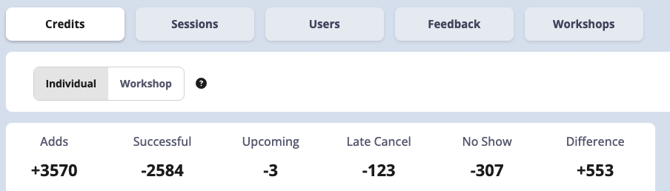
The Credits tab can be filtered by date range, defaulting to viewing the last 30 days. You can also toggle between Individual credits and Workshop credits.
Data available in the Credits tab:
- Adds - credits purchased by the institution
- Successful - credits used on successfully attended sessions
- Upcoming - credits used to schedule upcoming sessions
- Late Cancel - credits used to schedule sessions a user late cancelled (within 24 hours of the session's date)
- No Show - credits used to schedule sessions a user no showed
- Difference - shows remaining credits available to the institution
Data visualizations available in the Credits tab:
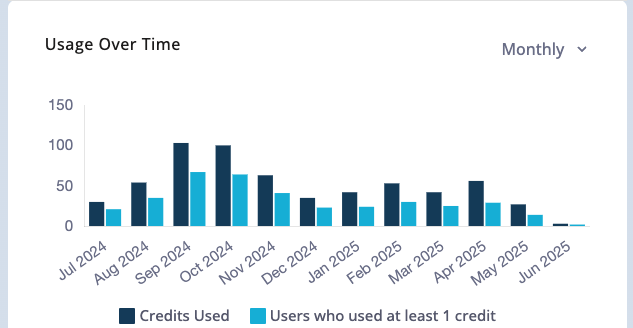
- Usage over time - shows the number of credits used in a given time frame. Can choose between Monthly (default), Yearly, Quarterly, Weekly, or Daily view.
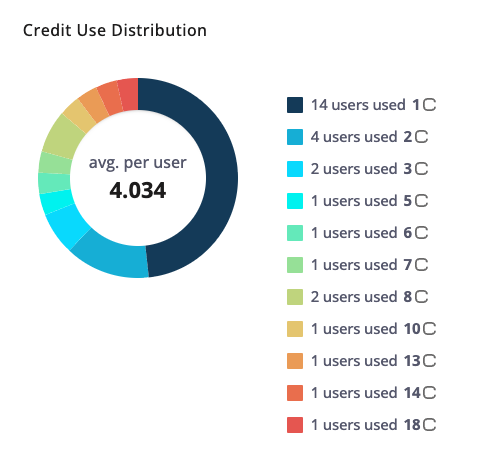
- Credit Use Distribution - shows the number of credits used by the number of users and an average. Most common for all partners: 1 credit, Average for all partners: 4