
The second of these tabs is for Sessions, which displays a list of sessions for that institution broken out into a few categories:
- All - Inclusive of all session activity across each of the three categories
- Successful - Sessions where the counselor and user both showed up for the scheduled session
- Canceled - Sessions that were canceled by a counselor, user, or BetterMynd Administrator. Includes late cancellations (spent a credit), and refunded cancellations (did not spend a credit).
- Not Attended - Sessions where the user, counselor, or both did not show for a scheduled session. Credits are refunded if the counselor did not attend.
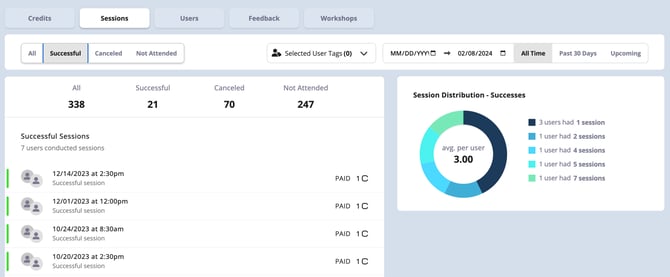
In addition to these categories, the list of displayed sessions can also be filtered by a specific date range. Applying filters will update both the list and the Session Distribution graphic on the right side of the screen.