
A series of reports are available to download real-time data in the BetterMynd platform.
To access reporting features, log in to your BetterMynd administrator account and click on the Download Reports text in the upper right corner below your name.
You can choose from two options and a series of filters:
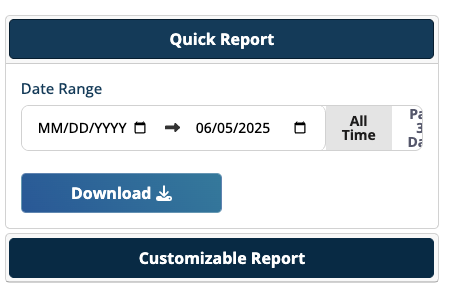
- Quick Report - provides all data for the time frame selected. Most administrators select this option.
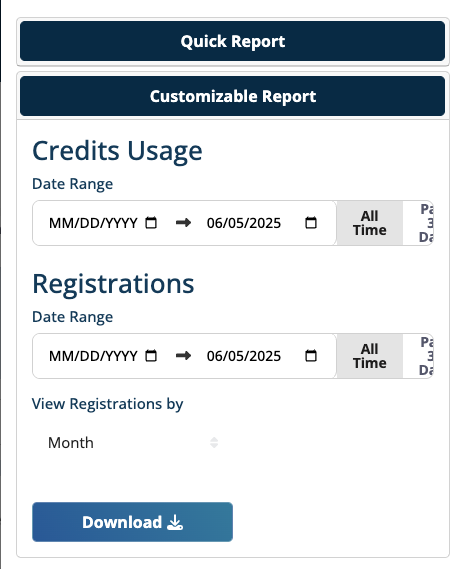
- Customizable Report - select a time frame for credit usage or student registrations and view by Year, Quarter, Month, Week, or Day. Ideal for semesterly reporting or narrowing focus to registrations only.
After you choose the report type, select your date range (or choose the All Time quick option) and click Download.
Reports generate a PDF with information specific to your institution, including:
- Total registrations
- Scheduled Sessions
- Credits Remaining
- Estimated Days Remaining Until Credits Depleted
- Credit Usage through end date
- Total Credits Added
- Individual Credits Used
- Credits used on productive (successful) sessions
- Credits used on late canceled sessions
- Credits used on not-attended sessions
- Average Per User
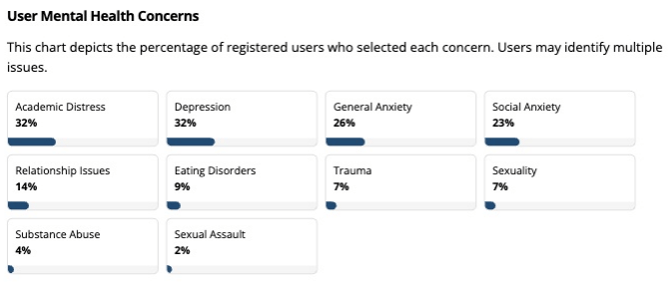
- Aggregated user-identified mental health concerns
- Aggregated user demographics including gender and ethnicity
If you are looking for additional data points, please reach out to your Campus Success Director or support@bettermynd.com.