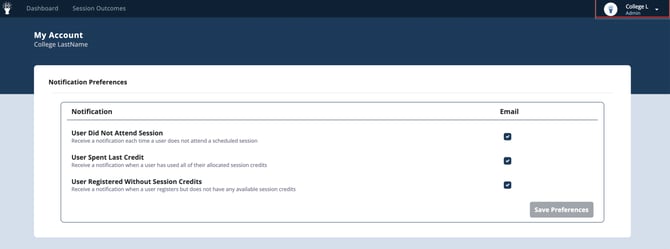
Campus administrators can be proactive with student activity and requests by signing up for notifications.
Available notifications include:
- User Did Not Attend Session
- User Spent Last Individual Session Credit
Receive a notification when a user has used all of their allocated individual session credits
- User Registered Without Session Credits
Receive a notification when a user registers but does not have any available session credits
- User Requested More Credits (Currently in beta)
Receive a notification when a user requests more credits
Notifications will send you an email when any of the above selected notifications are checked in your profile. This allows you to proactively respond to student requests, take action when a student No Shows for a session, or assign credits.
If notifications are active, a new notification will also add a small red dot to the bell icon in the upper right corner of the administrator dashboard.
To set up notifications:
- Log in at bettermynd.com
- Click on your name in the upper right corner
- Select Account from the dropdown menu
- Check off the notifications you would like to receive
- Click the Save button