Click the Session Outcomes tab in the upper left corner navigation of the dashboard.
The possible outcomes that will display within this view are:
- Successful: A successful, completed session conducted on the platform.
- No-show: A user did not show up to a scheduled, approved session.
- Late Cancel: A user canceled a session within 24 hours of the session start time.
The report shows sessions where a credit was expended by the student, meaning there are some scenarios where a session may not appear in this view. For example, when a refund is provided to a student, it will not show up in the outcomes report.
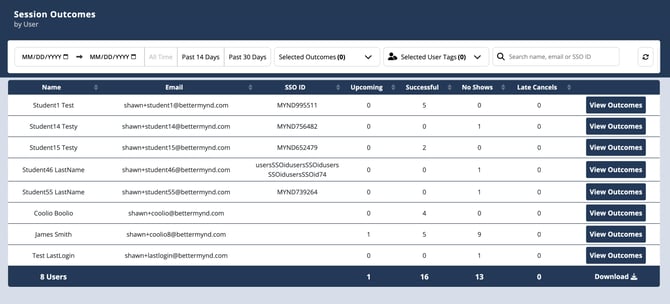
Admins have the ability to filter the results in several ways:
Date
- Specific date range
- All time
- Last 14 days
- Last 30 days
Selected outcome
- Upcoming
- Successful
- User No Show
- Late Canceled
Search: Admins are able to search by Name, Email or SSOID.
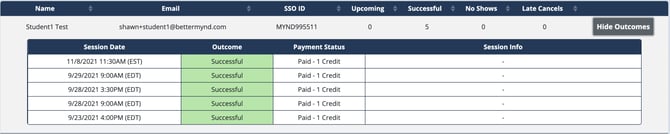
When looking at the summary data for an individual user, you are able to click View Outcomes to expand that row to display more detailed information about the individual sessions. This view will include:
- Session Date
- Outcome
- Payment Status
- Session Info (if it exists)