
This short video provides an overview of the student registration experience.
When a user registers for the platform, they will first input their email address to be linked to a specific institution.
After entering their email, a verification email will be sent to authenticate and confirm the student's request to register.
Once they click on the button in the verification email, they will answer a few questions:
Terms and Conditions
The initial screen will present the BetterMynd Terms and Conditions. In order to continue, the user must:
1. Acknowledge that they are at least 18 years of age.
2. Accept BetterMynd's Terms & Conditions.
3. Acknowledge that de-identified demographic information may be shared with their institution.
Note: For Faculty & Staff implementations, we will not display the final checkbox regarding the sharing and usage of de-identified data, since campus partners offering BetterMynd to faculty and staff do not have access to a dashboard for those users.

Crisis Question
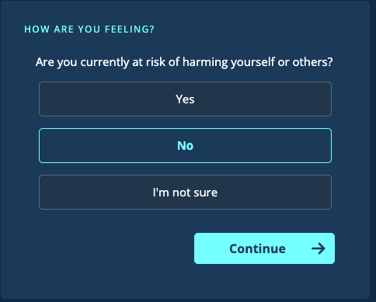
Students will confirm that they are not in active crisis to continue the registration process. If they select "Yes" or "Not Sure" they will be directed to crisis resources.
User Demographics
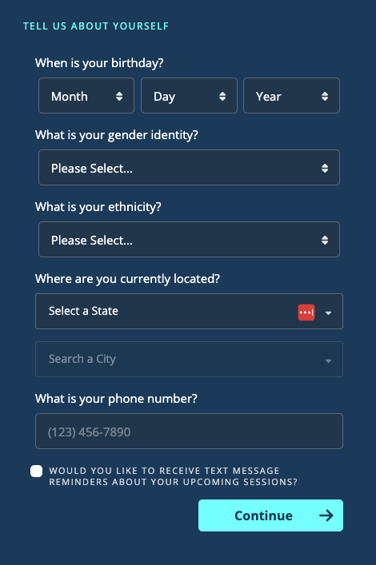
We require the following demographic information from the user when registering for the platform:
- Date of Birth: Required so that the user can self-verify that they are at least 18 years of age. Is also shared with counselors, in the event that they need to provide this information in the event of a crisis.
- Gender, Ethnicity: Both fields are required, though the user always has the option to select “Prefer not to answer.”
- Current Location: Used to determine which counselors should be presented to the user, based on a combination of user location and counselor licensure(s).
- Phone Number: If the user opts in, can be used to receive SMS reminder regarding upcoming counselor and workshop sessions.
Mental Health Concerns
Users are able to identify specific areas of concern, which will be used by the counselor matching algorithm to suggest potential matches based on counselor specialties.
While we share this information with campus partners in aggregate, we do not present or associate it with individual users.

Counselor Preferences
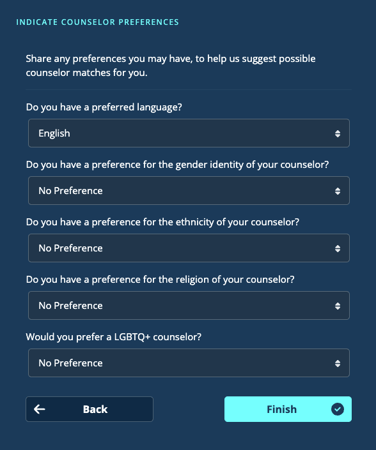
Finally, we offer the user the ability to indicate any default counselor preferences they may have when working with someone on the BetterMynd platform. These include preferences for:
-
Language
-
Gender identity
-
Ethnicity
-
Religion
-
LGBTQ+
These selections can be updated at any time via the user's profile. Additionally, they'll be able to browse and select counselors who don't exactly match their stated preferences.
When they click Finish, the user has completed the registration process and lands on the BetterMynd dashboard.